
Not so long ago we showed you the new progressive web app functionality coming in XF 2.2 and since then we've added a couple of related bits which we are including as of XenForo 2.2 Beta 2.
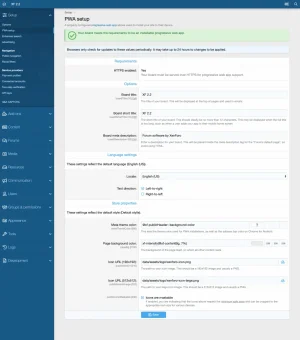 There are a number of requirements you need to meet before a PWA becomes installable by most browsers. Some of these requirements are server config related, others are options, some are language based and some are style based.
While they're not particularly strenuous, we thought it would be worth highlighting all of these requirements in one place to make the process of setting up your PWA even easier.
To check if your forum meets the requirements to be installable as a progressive web app you now just need to head over to Admin > Setup > PWA setup.
Once complete the PWA will now be installable on supported browsers.
While not directly related to PWAs this is another modern web API that aims to bridge the gap between web apps and native apps by leveraging native device features. The Web share API allows your users to share content from your forum using the native device "share sheet" built into their devices. This one is even supported by iOS!
Instead of us rendering the typical share icons in various places like these:

We instead display a single share control:

And where we display the content-specific search icon, such as in the top right corner of posts, tapping it no longer displays the search tooltip.
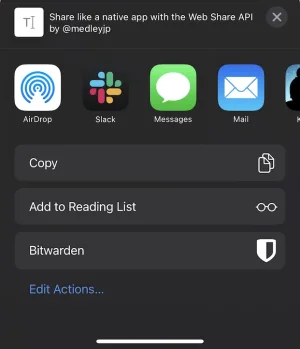
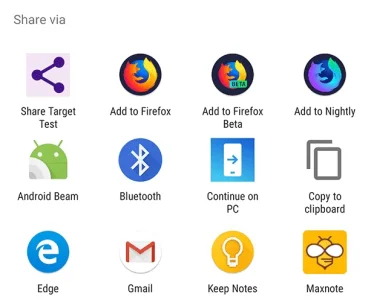
Tapping the share button opens up the default experience for sharing content on your device. Most apps on most devices will extend the default share sheet meaning in just a few taps your users can be sharing your content with their friends/colleagues via whichever native app they have on their devices.
In other PWA related news we have also added a new style property.

This property allows you to indicate whether the icons you have provided are sufficiently padded enough to enable them to be cropped for various device icon styles. For example, it means your icon can be cropped to a circle so it appears nicely on Android devices without cropping anything out of your icon.
In most cases if you do not verify your icons are maskable they will usually be shrunk to fit the "safe area" but this may not look optimal so it's worth doing.
You can read more about maskable icons here and you can use this tool to help test and verify your icons are maskable.
 PWA setup helper
There are a number of requirements you need to meet before a PWA becomes installable by most browsers. Some of these requirements are server config related, others are options, some are language based and some are style based.While they're not particularly strenuous, we thought it would be worth highlighting all of these requirements in one place to make the process of setting up your PWA even easier.
To check if your forum meets the requirements to be installable as a progressive web app you now just need to head over to Admin > Setup > PWA setup.
Once complete the PWA will now be installable on supported browsers.
Web share API
While not directly related to PWAs this is another modern web API that aims to bridge the gap between web apps and native apps by leveraging native device features. The Web share API allows your users to share content from your forum using the native device "share sheet" built into their devices. This one is even supported by iOS!
Instead of us rendering the typical share icons in various places like these:
We instead display a single share control:
And where we display the content-specific search icon, such as in the top right corner of posts, tapping it no longer displays the search tooltip.
Tapping the share button opens up the default experience for sharing content on your device. Most apps on most devices will extend the default share sheet meaning in just a few taps your users can be sharing your content with their friends/colleagues via whichever native app they have on their devices.
In other PWA related news we have also added a new style property.
This property allows you to indicate whether the icons you have provided are sufficiently padded enough to enable them to be cropped for various device icon styles. For example, it means your icon can be cropped to a circle so it appears nicely on Android devices without cropping anything out of your icon.
In most cases if you do not verify your icons are maskable they will usually be shrunk to fit the "safe area" but this may not look optimal so it's worth doing.
You can read more about maskable icons here and you can use this tool to help test and verify your icons are maskable.





