

Blandt
Well-known member
Using Google instead of setting up your own SMTP server is an easy process and one less thing to worry about and maintain on your own server. and this is Uber Newbie how to
1st you need to setup your domain name MX records to point to your custom google email.
It's free :
http://google.com/a
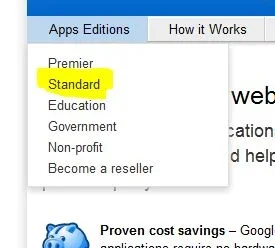
Select Standard from the Apps Editions
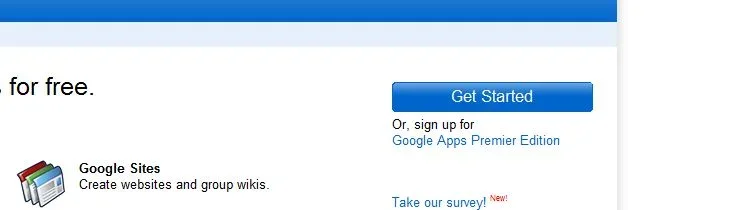
Then click on get started,
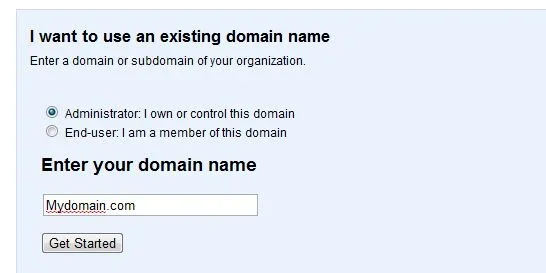
you will be prompted with a field to enter your domain name :
Follow the instructions from there. Google covers every major Domain registrar on how to Edit your MX records.
once you verify your domain, Activate the Email service and add a new user. In this case will create support@mydomain.com So all of the administrative emails generated by xenforo will be sent from that email : support@mydomain.com
Then logon to your XenForo admin panel and select the option tab
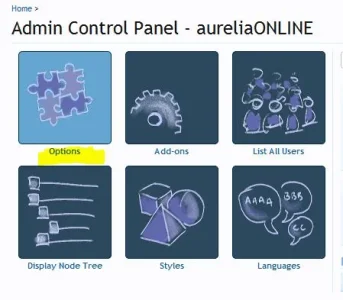
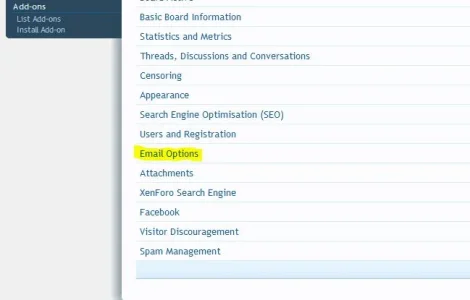
Then select Email options :
Then finally setup your xenforo to use google SMTP Like this
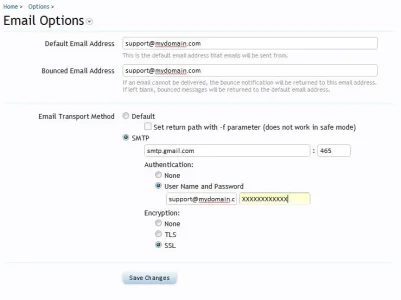
Make sure you enter support@mydomain.com complete (the whole email string) your password you just setup with google apps.
The port is 465 or 587
Select SSL
Click save and happy emailing
This way you avoid having your emails flagged as spam on your users end.
Let me know if further help is needed.
1st you need to setup your domain name MX records to point to your custom google email.
It's free :
http://google.com/a
Select Standard from the Apps Editions
Then click on get started,
you will be prompted with a field to enter your domain name :
Follow the instructions from there. Google covers every major Domain registrar on how to Edit your MX records.
once you verify your domain, Activate the Email service and add a new user. In this case will create support@mydomain.com So all of the administrative emails generated by xenforo will be sent from that email : support@mydomain.com
Then logon to your XenForo admin panel and select the option tab
Then select Email options :
Then finally setup your xenforo to use google SMTP Like this
Make sure you enter support@mydomain.com complete (the whole email string) your password you just setup with google apps.
The port is 465 or 587
Select SSL
Click save and happy emailing
This way you avoid having your emails flagged as spam on your users end.
Let me know if further help is needed.





