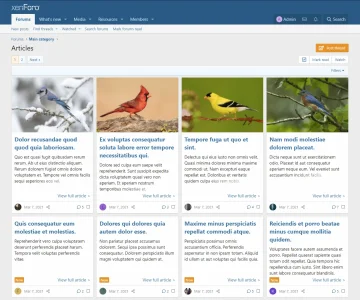
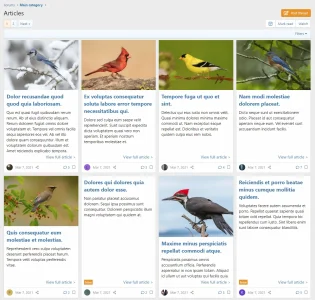
Article Forum Symmetrical Grid Layout

Article Forum Symmetrical Grid Layout

Paul B

XenForo moderator
Staff member
Looks good! I had a quick second to install it and give it a try and yes, all the images are displaying. 🥳

Now I have to get it to work on the third party style properly. Works perfectly on the default XF style, but third party, I have the content width narrower and the bottom margins are bleeding into the tops of the images in the following row, along with the date wrapping onto new lines.

I don't really want to let the page stretch out wider but on the other hand, that might be best. Or I may just do away with the sidebar, as that is forcing things smaller than they need to be.

So I just need a little tweaking here and there, and I think we'll be rockin' this 4-across for Classifieds. 👍👍
 
It's a non-public development forum, but I got rid of the sidebar and that mostly fixed it. I only need to add some space between the footer and the images in the next row, and I think we'll be good.

This seems to be where I can increase the margin--it's working in the inspector. I can add this to extra.less for that particular style.

CSS:
[data-container-key="node-87"] .block.block--articles.block--previews .block-body .message--articlePreview {
    margin-bottom: 20px;
}
 
This modification will also apply to subsequent pages.

Or did you mean you only want it to apply from page 2 onwards?
I think he means from page 2 onwards, as I had the same question myself back when we first saw the new layout.

You an just edit the original code and add it like so:
I considered that.

What I've been doing is using a template modification to insert this code into extra.less, so it affects all styles. Then I can tweak an individual style separately if needed. It's made a world of difference, as I put all of what I call my "common" extra.less edits into template modifications, then wrap them up into an add-on that I can easily transport to the live forum when I do the upgrade.
 
I've made a suggestion to have the page ID available.

 
Back
Top Bottom