Resource icon

Adding the XFMG Media Block to a sidebar or portal page

Martok

Well-known member
Martok submitted a new resource:

Adding the XFMG Media Block to a sidebar or portal page - Add the media block in the standard sidebar, Featured Threads, Widget Framework & XenPorta

The XenForo Media Gallery media block can be added to the standard forum sidebar in XenForo as well as the sidebars and portal pages of CTA Featured Threads & Portal, Widget Framework and XenPorta.


Code
First, you will need the following media block code from Chris:

Code:
<xen:include template="xengallery_media_block">
    <xen:set var="$blockPhrase">{xen:phrase xengallery_new_media}</xen:set> // Use either {xen:phrase xengallery_new_media}, {xen:phrase...

Read more about this resource...
 
Thank you for this. It seems this is not the same block that comes with xenforo media gallery. Is there a way to make it look like exactly same as the one in the forum index?
It isn't the same block as that is specific to the XenForo forum index. It should be similar though and you can probably style it to be similar too. Instructions on styling the block title are in the resource. Beyond that I've not tried anything as I don't use the main block, only the sidebar block. You will need to play around with CSS to achieve the look you require.
 
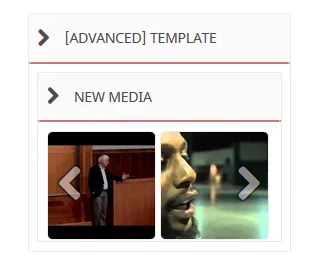
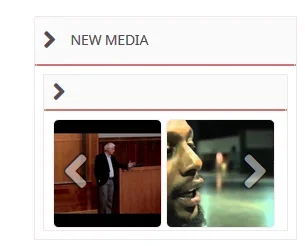
See attached. If I use advanced template without wrapper, it shows no header.
It does have a header, I can see it in the screenshot. It says "Media". You would have to style this to match the block headers in your style.

If I use advanced template with wrapper, I get double headers.
You could try using this, but you'd need to remove this line of code:

Code:
<xen:set var="$blockPhrase">{xen:phrase xengallery_new_media}</xen:set> // Use either {xen:phrase xengallery_new_media}, {xen:phrase xengallery_random_media} or your own custom title

You'd then need to put an appropriate Title in the widget (which you haven't, hence it shoieing [Advanced] Template in your screenshot).
 
It does have a header, I can see it in the screenshot. It says "Media". You would have to style this to match the block headers in your style.


You could try using this, but you'd need to remove this line of code:

Code:
<xen:set var="$blockPhrase">{xen:phrase xengallery_new_media}</xen:set> // Use either {xen:phrase xengallery_new_media}, {xen:phrase xengallery_random_media} or your own custom title

You'd then need to put an appropriate Title in the widget (which you haven't, hence it shoieing [Advanced] Template in your screenshot).

Thanks. Close, but one last problem.
 

Attachments

  • widget.webp
    widget.webp
    5.8 KB · Views: 32
Thanks. Close, but one last problem.

Just for kicks, in the template you created and pasted this code:

Code:
<xen:include template="xengallery_media_block">
<xen:set var="$blockPhrase">{xen:phrase xengallery_new_media}</xen:set> // Use either {xen:phrase xengallery_new_media}, {xen:phrase xengallery_random_media} or your own custom title
<xen:set var="$blockId">XFMGMediaForumListSidebar</xen:set> // This can be changed but must be something unique.
<xen:set var="$type">new</xen:set> // You can set this to 'rand' for a random selection.
<xen:set var="$items">2</xen:set> // Any number. Number of images that are visible in the slider.
<xen:set var="$limit">20</xen:set> // Any number. Number of images to be loaded (not all are visible).
<xen:set var="$slideWidth">160</xen:set> // This is the width of each slide in the slider. The slides may not be exactly this width due to responsive design resizing them dynamically.
<xen:set var="$categories">all</xen:set> // Use a comma separated list to display images from selected categories e.g. 2,3,5,7. Set to 'all' to include all categories, 0 to exclude
<xen:set var="$albums">1</xen:set> // Set to 1 to include images from albums, 0 to exclude
<xen:set var="$isSidebarBlock">1</xen:set> // Sets the styling so it will look like a sidebar block
<xen:set var="$captions">1</xen:set> // Set to 1 to show captions on hover, set to 0 to always hide.
<xen:set var="$noResponsive">1</xen:set> // Set to 0 for responsive, 1 for fixed. Responsive will show more images at a smaller size at narrower browser widths, fixed will keep the number of images set in $items at the same size whatever the browser width.
</xen:include>

Can you wrap this div around it? Then try without the wrapper:

Code:
<div class="section">
<xen:include template="xengallery_media_block">
<xen:set var="$blockPhrase">{xen:phrase xengallery_new_media}</xen:set> // Use either {xen:phrase xengallery_new_media}, {xen:phrase xengallery_random_media} or your own custom title
<xen:set var="$blockId">XFMGMediaForumListSidebar</xen:set> // This can be changed but must be something unique.
<xen:set var="$type">new</xen:set> // You can set this to 'rand' for a random selection.
<xen:set var="$items">2</xen:set> // Any number. Number of images that are visible in the slider.
<xen:set var="$limit">20</xen:set> // Any number. Number of images to be loaded (not all are visible).
<xen:set var="$slideWidth">160</xen:set> // This is the width of each slide in the slider. The slides may not be exactly this width due to responsive design resizing them dynamically.
<xen:set var="$categories">all</xen:set> // Use a comma separated list to display images from selected categories e.g. 2,3,5,7. Set to 'all' to include all categories, 0 to exclude
<xen:set var="$albums">1</xen:set> // Set to 1 to include images from albums, 0 to exclude
<xen:set var="$isSidebarBlock">1</xen:set> // Sets the styling so it will look like a sidebar block
<xen:set var="$captions">1</xen:set> // Set to 1 to show captions on hover, set to 0 to always hide.
<xen:set var="$noResponsive">1</xen:set> // Set to 0 for responsive, 1 for fixed. Responsive will show more images at a smaller size at narrower browser widths, fixed will keep the number of images set in $items at the same size whatever the browser width.
</xen:include>
</div>
 
I'm trying to get a Font Awesome icon to display before New Media in the XFMG Sidebar widget (widget framework) but its not working by changing the template or by changing the phrase. I've also tried to remove $Blockphrase from the xengallery_media_block_sidebar template to see if I could get the block to display the widget title instead. Still no luck. Any ideas?

The FA image I'm trying to insert:
Code:
fa-picture-o
Unicode: f03e
<i class="fa fa-picture-o"></i>
 
Back
Top Bottom