Post Limit Per Node by AddonsLab

Post Limit Per Node by AddonsLab 1.6.1

No permission to download
Registered Group, is my inactive/new member Group.
And it's my Main group for every user.

I see. Unfortunately, this is how the permissions work, and you will need to change your usergroup setup, maybe setting up your "Main" group to have all properties it would inherit from "Registered", and remove your active users from "registered" users, so you don't have to deal with two usergroups for the same user.
 
AddonsLab updated Post Limit Per Node by AddonsLab with a new update entry:

New option - Count threads as posts

Here is the next release of Post Limit Per Node add-on, which implements a better control over post counting method. By default, the add-on counts any thread as one post as well. Now you will be able to configure this in product's options and decide if a thread should be counted or not counted as a post, and if so, in which forums.

We have also added a new permission, that configures if thread starter's own posts should be counted in post limit or no.

Now users will also see, how much...

Read the rest of this update entry...
 
Hello @Alfa1 ,

1. Yes, you can. For that you need to enable node-based check for that particular node in product options, and set the limits in node permissions. You can set the limit on number of posts and configure the product to count a thread as a post.

2. Yes, by switching the user to another usergroup which does not have the limits.

3. There is a template used for the error messages, that contain the phrases and variables (how many threads/posts etc. in how much time can be posted). You can edit the template to enhance the message with any HTML, links etc.

Just let us know if you have any other questions.

Thank you!
 
2. Yes, by switching the user to another usergroup which does not have the limits.
That seems to be a no. The usergroup will stay, but account upgrades adds another usergroup. The account upgrade needs to remove the limitations of the original usergroup.

For example:
  1. registered usergroup (no restrictions)
  2. new members usergroup (max X posts per 24 hours)
  3. Account Upgrade usergroup (lift restriction)
There is a template used for the error messages, that contain the phrases and variables (how many threads/posts etc. in how much time can be posted). You can edit the template to enhance the message with any HTML, links etc.
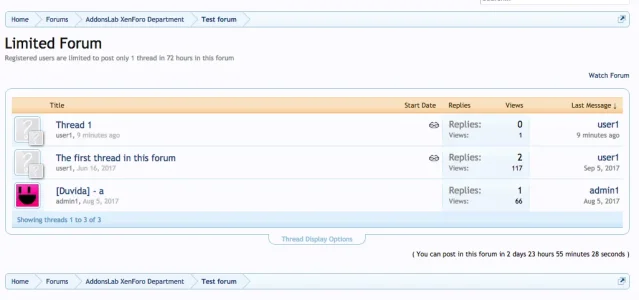
Is this clear enough for members? or will this result in support messages? Could you post a screenshot?
Please use a phrase for this so that its easily changed and stays the same with upgrades.
 
That seems to be a no. The usergroup will stay, but account upgrades adds another usergroup. The account upgrade needs to remove the limitations of the original usergroup.

For example:
  1. registered usergroup (no restrictions)
  2. new members usergroup (max X posts per 24 hours)
  3. Account Upgrade usergroup (lift restriction)

Is this clear enough for members? or will this result in support messages? Could you post a screenshot?
Please use a phrase for this so that its easily changed and stays the same with upgrades.

Sure, it works with adding a usergroup as well. The limits are implemented as XenForo "integer" permissions and default XenForo implementation of such permissions apply, when a user has different usergroups. In general, the usergroup with higher value for the permission gets higher priority, and "unlimited" option applies with highest priority. So, in your case, the limited usergroup should have the values defined, and the "upgraded" usergroup should set it to "unlimited".

The message is shown instead of XenForo's default message about not having permission to post a thread:

Screenshot at Nov 24 16-47-56.webp

The message is too much complicated to be one single phrase, as it many cases it has to shown different content (e.g. the time to wait is only 1 minutes, it does not make sense to write that 0 days, 0 hours and 1 minutes are left).

If you want to have all these details in your message, than you need a template with several phrases and conditions as well. Here is the content of the template. Feel free to suggest if you more optimal way to implement this, that would match your needs and the needs of users who use it its current form.

Code:
<span class="element">(
<xen:if is="{$posts}">
  {xen:phrase alpl_you_can_post_in_this_thread}
  <xen:else />
  {xen:phrase alpl_you_can_post_in_this_forum}
</xen:if>
<xen:if is="{$postedTimeInfo.days}">
{$postedTimeInfo.days}
    <xen:if is="{$postedTimeInfo.days} ==1">
        {xen:phrase alpl_day}
    <xen:else />
        {xen:phrase alpl_days}
    </xen:if>
</xen:if>
<xen:if is="{$postedTimeInfo.hours}">
{$postedTimeInfo.hours}
    <xen:if is="{$postedTimeInfo.hours} ==1">
          {xen:phrase alpl_hour}
    <xen:else />
        {xen:phrase alpl_hours}
    </xen:if>
</xen:if>
<xen:if is="{$postedTimeInfo.minutes}">
{$postedTimeInfo.minutes}
    <xen:if is="{$postedTimeInfo.minutes} ==1">
          {xen:phrase alpl_minute}
    <xen:else />
            {xen:phrase alpl_minutes}
    </xen:if>
</xen:if>
<xen:if is="{$postedTimeInfo.seconds}">
{$postedTimeInfo.seconds}
   <xen:if is="{$postedTimeInfo.seconds} ==1">
          {xen:phrase alpl_second}
   <xen:else />
            {xen:phrase alpl_seconds}
   </xen:if>
</xen:if>
)</span>

Thank you!
 
Back
Top Bottom