
You are using an out of date browser. It may not display this or other websites correctly.
You should upgrade or use an alternative browser.
You should upgrade or use an alternative browser.
Resource icon
Adding the XFMG Media Block to a sidebar or portal page
- Thread starter Martok
- Start date


Martok
Well-known member
Yes. See the explanation in the code at the top of the resource on how to exclude certain or even all categories.I've been using this religiously, good stuff @Martok.
Is it possible to adapt this to show albums only instead of individual images?
e.g. to show the last three created albums.
Anton_Bodryachkom
Active member
Iam sorry for noob questions , but where do i add this code
Code:
<div class="section">
<xen:include template="xengallery_media_block">
    <xen:set var="$blockPhrase">{xen:phrase xengallery_new_media}</xen:set> // Use either {xen:phrase xengallery_new_media}, {xen:phrase xengallery_random_media} or your own custom title
    <xen:set var="$blockId">XFMGMediaForumListSidebar</xen:set> // This can be changed but must be something unique.
    <xen:set var="$type">new</xen:set> // You can set this to 'rand' for a random selection.
    <xen:set var="$items">2</xen:set> // Any number. Number of images that are visible in the slider.
    <xen:set var="$limit">20</xen:set> // Any number. Number of images to be loaded (not all are visible).
    <xen:set var="$slideWidth">160</xen:set> // This is the width of each slide in the slider. The slides may not be exactly this width due to responsive design resizing them dynamically.
    <xen:set var="$categories">all</xen:set> // Use a comma separated list to display images from selected categories e.g. 2,3,5,7. Set to 'all' to include all categories, 0 to exclude
    <xen:set var="$albums">1</xen:set> // Set to 1 to include images from albums, 0 to exclude
    <xen:set var="$isSidebarBlock">1</xen:set> // Sets the styling so it will look like a sidebar block
    <xen:set var="$captions">1</xen:set> // Set to 1 to show captions on hover, set to 0 to always hide.
    <xen:set var="$noResponsive">1</xen:set> // Set to 0 for responsive, 1 for fixed. Responsive will show more images at a smaller size at narrower browser widths, fixed will keep the number of images set in $items at the same size whatever the browser width.
</xen:include>
</div>There are detailed instructions in the main resource description, depending on where you intend to add it.
Anton_Bodryachkom
Active member
Ogh , i missed this part "Widget FrameworkThere are detailed instructions in the main resource description, depending on where you intend to add it.
1. ACP > Appearance > Templates
Create a new template (I called mine xengallery_media_block_sidebar but you can call it what you like) and paste in the media block code" idk whats wrong with me


Alpha1
Well-known member
Where should I make modifications to make the slider auto-slide and slide multiple images per slide?
Martok
Well-known member
That's beyond the scope of this guide, which is simply to add the Media block as it currently works.
Alpha1
Well-known member
I was afraid you would say that. lol. Thanks anyway for the quick and easy guide.

51463
Well-known member
Is it possible to adapt this to show albums only instead of individual images?
e.g. to show the last three created albums.
Yes. See the explanation in the code at the top of the resource on how to exclude certain or even all categories.
It's not possible. It shows the latest and each individual image within all albums but not the "lastest created albums"


Dadparvar
Well-known member
Thanks. Great.
Is it possible to add auto sliding effect? it moves automatically one to left each 3 or 4 seconds.
Any opinion on how to do that will be appreciated.
Is it possible to add auto sliding effect? it moves automatically one to left each 3 or 4 seconds.
Any opinion on how to do that will be appreciated.
Martok
Well-known member
That is not related to this resource, which is only about adding the XFMG Media block to the sidebar or portal page.Thanks. Great.
Is it possible to add auto sliding effect? it moves automatically one to left each 3 or 4 seconds.
Any opinion on how to do that will be appreciated.
You will need to post in the Media Gallery support section about this.
Hi @Martok I need this! But I have xenporta 2, can I add a recent media section like this to the home page there?
Martok
Well-known member
As I said in an earlier post, this only works for XenPorta 1. New XenPorta widgets are required for XenPorta 2. I believe someone created one and posted it somewhere in the XenPorta 2 discussion thread.Hi @Martok I need this! But I have xenporta 2, can I add a recent media section like this to the home page there?
As I said in an earlier post, this only works for XenPorta 1. New XenPorta widgets are required for XenPorta 2. I believe someone created one and posted it somewhere in the XenPorta 2 discussion thread.
Ok, thank you! could it be this?
https://xenforo.com/community/threads/looking-to-xenporta-2-random-media-block.89669/
Martok
Well-known member
No idea, I don't use XenPorta 2, you'd be better asking in the discussion thread.Ok, thank you! could it be this?
https://xenforo.com/community/threads/looking-to-xenporta-2-random-media-block.89669/
thank you!No idea, I don't use XenPorta 2, you'd be better asking in the discussion thread.
click here
Active member
Thanks @Martok Quick question, the title links to "mysite.com/forums/find-new/media" is there a way to link it to a specific category instead?

bibitbunga
Active member
@Martok I have implemented this on my Widget Framework list widget but nothing appears.
Have I got some setting error? Please see this:
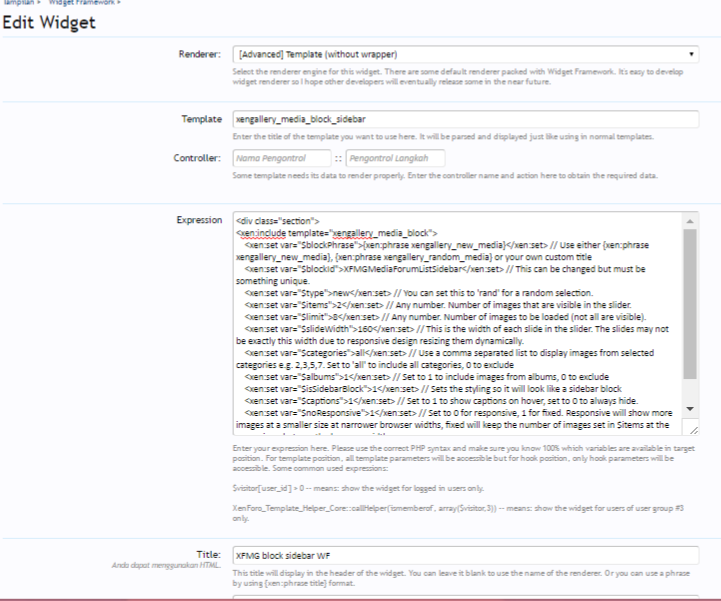
Thank you Martok
Have I got some setting error? Please see this:
Thank you Martok
Similar threads
- Replies
- 1
- Views
- 821


- Question
- Replies
- 1
- Views
- 2K
