Side By Side Nodes [Deleted]

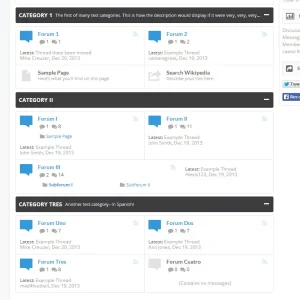
@Audentio, I also found out that if you enable the feature "Show Forum Descriptions on Node List" and keep "Enable Forum Descriptions Tooltips" disabled, from Style Properties: Forum / Node List, the alignment will fail if the the number of lines of the tooltip on one of the nodes does not match the number of lines of the one beside it.

For instance:

[Node One]...........[Node 2]
Line 1....................Line1
Line2​
 
Hi again @Audentio,

When I'm using this code:

HTML:
/* METHOD 2: SIDE BY SIDE FORUM, PAGE, LINK NODES */

@media (min-width: @maxResponsiveMediumWidth) {

    {xen:helper clearfix, '.nodeList'}

    .nodeList .node.level_2 {float: left; width: 50%;}

    .nodeList .node.level_2:nth-child(odd) {
        clear: left;
    }

/* Uncomment/comment to hide/display last post */
.nodeList .node.category .node .nodeText {margin-right: 10px;}
    .nodeList .node.category .node .nodeLastPost, .nodeList .node.category .node .nodeControls {display: none;}
/* End Hide/Display Last Post */

    .nodeList .node.level_2 .nodeLastPost {
        position: static;
        width: auto;
        padding-right: 20px;
        margin-top: 0;
    }

    .nodeList .node.level_2 .nodeText {margin-right: 26px;}
    .nodeList .node.level_2 .nodeControls {right: 8px;}

}

    .nodeList .node.level_2:last-child:nth-child(odd) {width: 100%;}
    .nodeList .node.level_2:last-child:nth-child(odd) .nodeText {
        margin-right: 270px;
    }

/* END METHOD 2: SIDE BY SIDE FORUM, PAGE, LINK NODES */

There are some glitches when viewing the site from mobile devices, at least from iPhones. For one, the view looks like one of the pictures you posted before, but in this case, in my case, for forums with no other forums by its side:

method2_step2-jpg.59175


Also, it is displaying "Last Post" (date and time only, not the URL nor the poster), whilst on a desktop view that info is hidden. :)

Feel free to visit the site (link on my signature) if you would like to have a look.

Thank you.
 
This is what I have in my Extra.css

Code:
/* SIDE BY SIDE NODES */

@media (min-width: @maxResponsiveMediumWidth) {

    {xen:helper clearfix, '.nodeList'}

    .nodeList .node.level_2 {float: left; width: 50%;}

    .nodeList .node.level_2:nth-child(odd) {
        clear: left;
    }

    .nodeList .node.level_2 .nodeLastPost {
        position: static;
        width: auto;
        padding-right: 20px;
        margin-top: 0;
    }

    .nodeList .node.level_2 .nodeText {margin-right: 26px;}
    .nodeList .node.level_2 .nodeControls {right: 8px;}
  .nodeList .node.level_2:last-child:nth-child(odd) {width: 100%;}
    .nodeList .node.level_2:last-child:nth-child(odd) .nodeText {
        margin-right: 270px;
    }

}
 
Well the reason is simple because of 'dynamic content'. Node descriptions that go to 1, 2, or 3 lines or node titles can cause this. If you have a sub-forum list instead of a dropdown this can happen too. Perhaps you made some other modifications.

You can do a couple things to fix this:

1. Limit the content in characters
2. Limit the content in height
3. Hide the content in such a way where it doesn't hinder the height of the node list item
4. Simply remove the bottom border, not a fix all but makes it look a bit better
5. Fix the height of everything, do a min/max-height, etc.
6. Just make the design 'work' with the height differences, the staggered look could look decent with the right style

But the best solution in my opinion is what I did with UI.X and that was have it display in a table format. I'm not sure if I'll post all the code here as there is quite a bit and it is heavily integrated with my framework, UI.X. Essentially it just adds borders in all the right places to make it look as if it were a <table>.

I've attached a screen.
 

Attachments

  • nodelist.webp
    nodelist.webp
    37.3 KB · Views: 48
Back
Top Bottom