Replace editor icons with Font Awesome [Deleted]

A tiny issue. The starting CSS will not work when Responsive design is disabled (.Responsive is only available in responsive mode), this also effects the Bold button FA icon. It works perfectly when you remove .Responsive from the css.

I cannot seem to get it working with responsive disabled. Responsive works fine, but I haven't been able to get the edits correct to make it work on a fixed layout.

Can you share your edits? I'm using XF 1.3 with UIX.
 
Sorry to be daft, but how do you find the id name of a custom bbcode and do you need to have an image icon there first?

You probably need this :D

Code:
html .redactor_toolbar li a.redactor_btn_custom_sub:before {
content: "\f0c1";
}
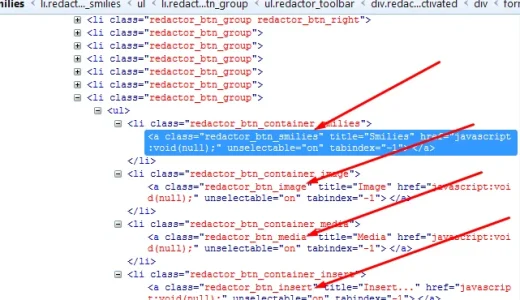
Replace the f0c1 code with one from here: http://fontawesome.io/cheatsheet/

To find any new code, just inspect the code and expand until you can view the actual link and look for the class name there, then replace it like above. Arrows point to the class names:


Screenshot_3.webp
 
They are. Anytime this part of the code
html .redactor_toolbar li a.redactor_btn_bold:before {content: "\f032"; color: #d11919;}
html .redactor_toolbar li a.redactor_btn_italic:before {content: "\f033"; color: #d11919;}
html .redactor_toolbar li a.redactor_btn_underline:before {content: "\f0cd"; color: #d11919;}
html .redactor_toolbar li a.redactor_btn_fontcolor:before {content: "\f042"; color: #FF9932;}
html .redactor_toolbar li a.redactor_btn_fontsize:before {content: "\f034"; color: #FF9932;}
html .redactor_toolbar li a.redactor_btn_fontfamily:before {content: "\f031"; color: #FF9932;}
html .redactor_toolbar li a.redactor_btn_createlink:before {content: "\f0c1"; color: #ffff5a;}
html .redactor_toolbar li a.redactor_btn_unlink:before {content: "\f127"; color: #ffff5a;}
html .redactor_toolbar li a.redactor_btn_alignment:before {content: "\f036"; color: #329932;}
html .redactor_toolbar li a.redactor_btn_unorderedlist:before {content: "\f0ca"; color: #329932;}
html .redactor_toolbar li a.redactor_btn_orderedlist:before {content: "\f0cb"; color: #329932;}
html .redactor_toolbar li a.redactor_btn_outdent:before {content: "\f03b"; color: #329932;}
html .redactor_toolbar li a.redactor_btn_indent:before {content: "\f03c"; color: #329932;}
html .redactor_toolbar li a.redactor_btn_smilies:before {content: "\f118"; color: #5A5AFF;}
html .redactor_toolbar li a.redactor_btn_image:before {content: "\f03e"; color: #5A5AFF;}
html .redactor_toolbar li a.redactor_btn_media:before {content: "\f008"; color: #5A5AFF;}
html .redactor_toolbar li a.redactor_btn_insert:before {content: "\f067"; color: #5A5AFF;}
html .redactor_toolbar li a.redactor_btn_custom_gallery:before {content: "\f030"; color: #5A5AFF;}
html .redactor_toolbar li a.redactor_btn_draft:before {content: "\f0c7"; color: #993299;}
html .redactor_toolbar li a.redactor_btn_undo:before {content: "\f0e2"; color: #e5e5e5;}
html .redactor_toolbar li a.redactor_btn_redo:before {content: "\f01e"; color: #e5e5e5;}
html .redactor_toolbar li a.redactor_btn_removeformat:before {content: "\f12d"; color: #e5e5e5;}
html .redactor_toolbar li a.redactor_btn_switchmode:before {content: "\f0f6"; color: #e5e5e5;}
html .redactor_dropdown a.alignLeft:before {content: "\f036"; color: #000000;}
html .redactor_dropdown a.alignCenter:before {content: "\f037"; color: #000000;}
html .redactor_dropdown a.alignRight:before {content: "\f038"; color: #000000;}
.redactor_dropdown a.quote:before {content: "\f10d"; color: #000000;
.redactor_dropdown a.spoiler:before {content: "\f024"; color: #000000;}
.redactor_dropdown a.code:before {content: "\f121"; color: #000000;}
.redactor_dropdown a.strikethrough:before {content: "\f0cc"; color: #000000;}
.redactor_dropdown a.saveDraft:before {content: "\f0c7"; color: #000000;}
.redactor_dropdown a.deleteDraft:before {content: "\f014"; color: #000000;}
is in the extra.css there is a problem with the staff banner. I can add anything above this and it is fine. If one line of customization is added then it screws up my banner.

kOBDx1j.png


Image on left is broken, image on right is my fixed image with the code OUT not in. If the code to edit tool bar is in it screws up the staff banner making it look like the left one
 
Back
Top Bottom
