XF 1.0 Real-World Page Loading Speed

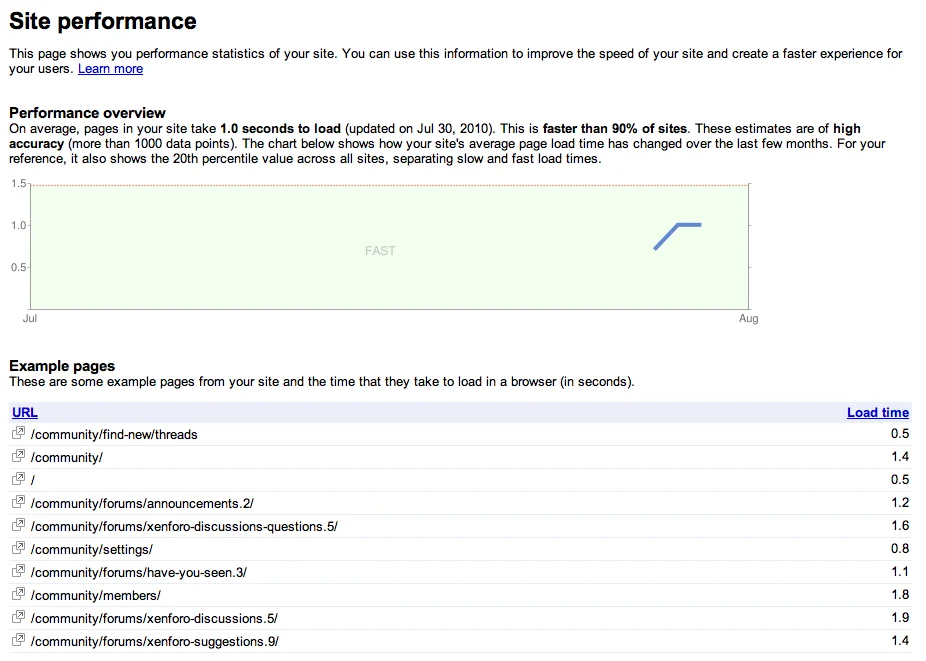
This isn't so much a 'have you seen this feature' post as one that goes some way to explaining why interacting with XenForo is such an immediate, pleasurable experience.

The following is screen-grabbed from Google Webmaster Tools.

google-webmaster-tools-page-load-speed-png.420
 

Attachments

  • Google Webmaster Tools Page Load Speed.webp
    Google Webmaster Tools Page Load Speed.webp
    59.1 KB · Views: 6,429
Why wouldn't it?
As soon as you manage the fastcgi processes by yourself, there won't be any problem.

They're using Apache, but I'm sure it would be pretty easy to get things working on nginx. The hardest part would be doing all the URL rewriting stuff. (I've never worked with nginx so I don't know how that type of stuff is implemented - it may just work as-is.) :)

I'm worried about the URL rewriting the most. That is my concern. So I was wondering if it will be easy to make XF works with Nginx without any trouble specially in URL rewriting.
 
Doesn't get much more simple that this:

Code:
<IfModule mod_rewrite.c>
    RewriteEngine On
    RewriteCond %{REQUEST_FILENAME} -s [OR]
    RewriteCond %{REQUEST_FILENAME} -l [OR]
    RewriteCond %{REQUEST_FILENAME} -d
    RewriteRule ^.*$ - [NC,L]
    RewriteRule ^.*$ index.php [NC,L]
</IfModule>

Simple? The only thing I see in that is a smiley :P

I'm not a good coder though, have no idea where to start :S
 
When I look at the code I can see something like that in it.

One day I wanna be as good as you :)

Maybe this will help you understand: :) URL rewriting is extremely powerful, you should try to learn it sometime. :)
Code:
<IfModule mod_rewrite.c>
    RewriteEngine On # turn the rewrite engine on
    RewriteCond %{REQUEST_FILENAME} -s [OR] # if the URL is a file that actually exists on the server
    RewriteCond %{REQUEST_FILENAME} -l [OR] # or a symbol link (it goes to an existing file on the server)
    RewriteCond %{REQUEST_FILENAME} -d # or a directory that actually exists on the server
    RewriteRule ^.*$ - [NC,L]  # do nothing (let the request continue)
    RewriteRule ^.*$ index.php [NC,L] # otherwise, just redirect the request to PHP, which will use environment variables, regex's, etc. to find out what the user is asking for (or display an error message if the request is invalid)
</IfModule>

 
Numbers do tell a story, but "feel" tells a story too. The site just "feels" snappy and quick, and that's how most users will see it. The average user doesn't care how many queries are being processed or file requests or all that. The site just feels fast as hell, and that's great.

Good job :)
Numbers can influence the feel though. Though I must admit without running my own page diagnostics (I did this like.. 30 mins after registering?) the site just felt right, it felt perfect, fast, very web 2.0.
 
Back
Top Bottom